UniDeck is free for everyone. Since November 2026, every widget and team feature is included at no cost. Some pages below still mention the retired Plus and Teams plans while we update them. What's free
Troubleshooting the API Hub
Common Issues and Solutions
Issue 1: API Requests Fail with No Response
If your API requests do not receive responses or timeout:
- Check Endpoint URL:
- Verify the endpoint URL entered in the Request Editor is correct.
- Ensure there are no trailing spaces or missing protocol specifications (
https://).
- Review Network Connectivity:
- Ensure you have stable internet connectivity.
- Confirm that your firewall or network policy does not block API requests.
Issue 2: Incorrect Response or Data Format
If responses are returned but not as expected:
- Validate Request Parameters:
- Double-check the parameters and request body entered in the Request Editor.
- Ensure headers (e.g., Content-Type, Accept) are correctly specified.
- Inspect Response Format:
- Use UniDeck’s Response Viewer to verify response headers and data format.
- Adjust your requests based on the actual response format (JSON, XML, plain text).
Issue 3: Authentication Errors
If your API call returns authentication errors (401 Unauthorized or 403 Forbidden):
- Verify Credentials and Tokens:
- Confirm that authentication credentials (API keys, OAuth tokens, etc.) are correctly entered.
- Ensure tokens have not expired; regenerate tokens if necessary.
- Check Authorization Headers:
- Make sure you include proper authorization headers as required by your API.
Using Response Viewer for Troubleshooting
The Response Viewer provides insights into each API response:
- Status Codes:
- Refer to status codes (e.g., 200, 400, 401, 500) to quickly identify response categories.
- Headers Inspection:
- Headers can reveal issues like incorrect content-type or authentication problems.
- Response Body:
- Carefully examine the returned body for error messages or unexpected data.
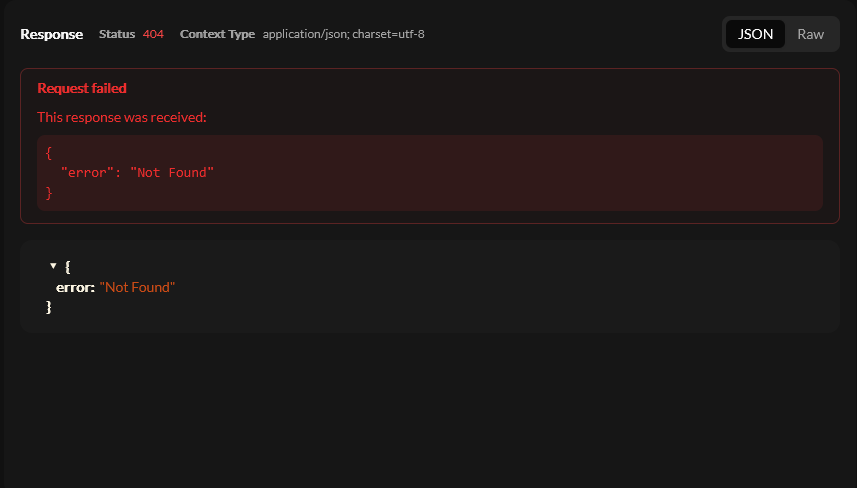
Response Viewer Error Example
Request Editor Verification
Ensure correct request setups by reviewing the following in the Request Editor:
- HTTP Method (GET, POST, PUT, DELETE):
- Verify that the correct HTTP method is selected according to your API documentation.
- Request Body and Parameters:
- Confirm request body formats (e.g., JSON payload) align with API requirements.
- Headers and Authentication:
- Cross-check headers, especially content types and authorization headers.
Advanced Troubleshooting
If issues persist after performing the above steps:
- Consult API Logs:
- Review detailed API logs from your API provider or internal logging mechanisms.
- Contact API Support:
- If an external API consistently fails, consult their official documentation or support team.
- UniDeck Support:
- For persistent issues related to UniDeck’s API Hub functionality, contact UniDeck support via [email protected].
This structured troubleshooting approach helps swiftly identify, diagnose, and solve common API integration challenges within UniDeck’s API Hub.